









After every quarterly survey, Sticki's HR team lost most of a day to the comments: six or seven hours of downloads, trend checks and slides. Plans reached employees almost a month later.
Here's the thing: the survey wasn't the problem. Scores tell you a team is slipping. Only the comments tell you why. And tagging each comment "positive" or "negative" still doesn't tell you what to fix first.
So this guide is for you if you're picking a tool to fix that. We looked at 8 employee sentiment analysis tools. For each one, we cover what its AI actually shows you, what it costs and what size team it fits. By the end, you should have a shortlist of 2–3 tools, without sitting through eight demos. One heads-up: we make ThriveSparrow, so it's on the list. We checked every competitor fact on that company's own website, and we point out where ours isn't the best fit.
Today, Sticki does the same analysis in about one to one and a half hours. What changed? The tool. A good one should:
- Sort comments into topics, then show how people feel about each one.
- Let you click through to the real comments, so you can double-check the AI.
- Cost a sensible amount for the size of your team.
Short on time? Start here. The right tool depends mostly on two things: how big your company is, and whether you run surveys.
- Small or mid-sized company that runs surveys: look at ThriveSparrow, Lattice or Leapsome. ThriveSparrow is built around reading survey comments and turning them into action plans. Lattice or Leapsome make more sense if you also want them for performance reviews.
- Bigger company that wants to compare itself with others: look at Culture Amp or Perceptyx. Both are strong on benchmarks and deep analytics.
- You don't run surveys at all: look at KeenCorp or Qualtrics XM Discover. They read the mood from places like email, chat and your intranet instead.
Employee sentiment analysis tools compared
These are list prices, billed yearly, from each vendor's pricing page (or a dated copy of it). Each tool's review below explains what the price includes.
Which tool fits your team?
The right employee listening platform depends on your organization's size, feedback requirements, existing HR processes and budget. Use the recommendations below to identify which tools are worth evaluating based on your priorities.
- For small and mid-sized HR teams seeking transparent pricing: ThriveSparrow, Lattice or Leapsome.
- For organizations connecting employee engagement with performance management and goals: Lattice or ThriveSparrow.
- For teams looking to consolidate surveys, performance reviews, goal management and learning: Leapsome.
- For organizations with deskless and frontline employees: ThriveSparrow (QR codes, text messages and 100+ languages) or CultureMonkey (SMS, WhatsApp and kiosk-based feedback).
- For organizations collecting feedback across the entire employee lifecycle, from onboarding to exit: CultureMonkey.
- For organizations prioritizing industry benchmarks and comparative engagement insights: Culture Amp or Perceptyx.
- For large enterprises running continuous employee listening programs with dedicated people analytics teams: Perceptyx.
- For organizations analyzing employee sentiment through workplace communication rather than traditional surveys: KeenCorp or Qualtrics XM Discover.
The 8 tools, reviewed
For each tool, you'll see what it's best for, its key features, its limits, the price and what to ask in the demo. To make the list, a tool had to use AI to read employee comments or messages and be on sale today. The list isn't a ranking.
How we evaluated these tools
- What we looked at: more than 20 pricing, product and help pages from the vendors themselves, all checked in November 2026. Each entry below links to its source.
- What we scored: five things that decide whether a tool really fixes the comment problem. Does it sort comments by topic, not just one overall score? Can you click through to the real comments? Does it protect anonymity? Can it reach people without a desk? Is the price easy to find?
- Same sources for every tool: each tool, ThriveSparrow included, was judged on its pricing page, product pages, help docs and product screens.
1. ThriveSparrow: Best for small and mid-sized HR teams
What it is:
ThriveSparrow is an AI-native employee engagement and performance platform. It runs engagement and pulse surveys, eNPS, recognition, one-on-ones, goals and performance reviews in one place, and uses AI to read survey comments, summarize results and suggest action plans.
At a glance:
- Price: from $3 per employee per month on the Engage plan (full plan details below).
- How to try it: a 14-day free trial; you sign up with a work email and no credit card.
- What it analyzes: the written answers people give in engagement surveys, pulse surveys and performance reviews.
The problem it solves. Reading every comment yourself doesn't scale. And a positive or negative tag on each one doesn't tell you what to fix. ThriveSparrow shows you which topic is dragging a team down, and whether it really affects engagement.
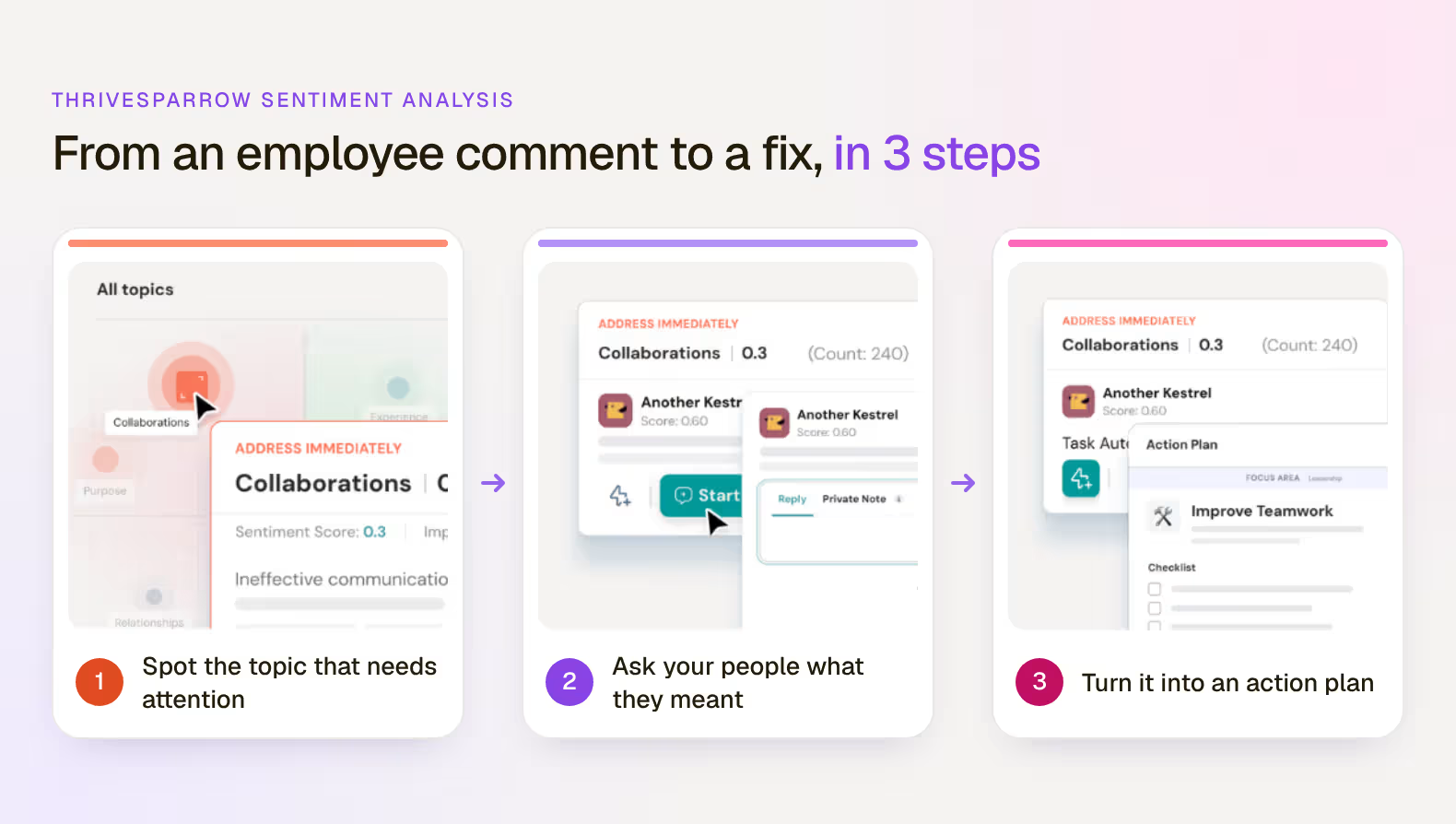
Here's what your first hour after a survey closes looks like:
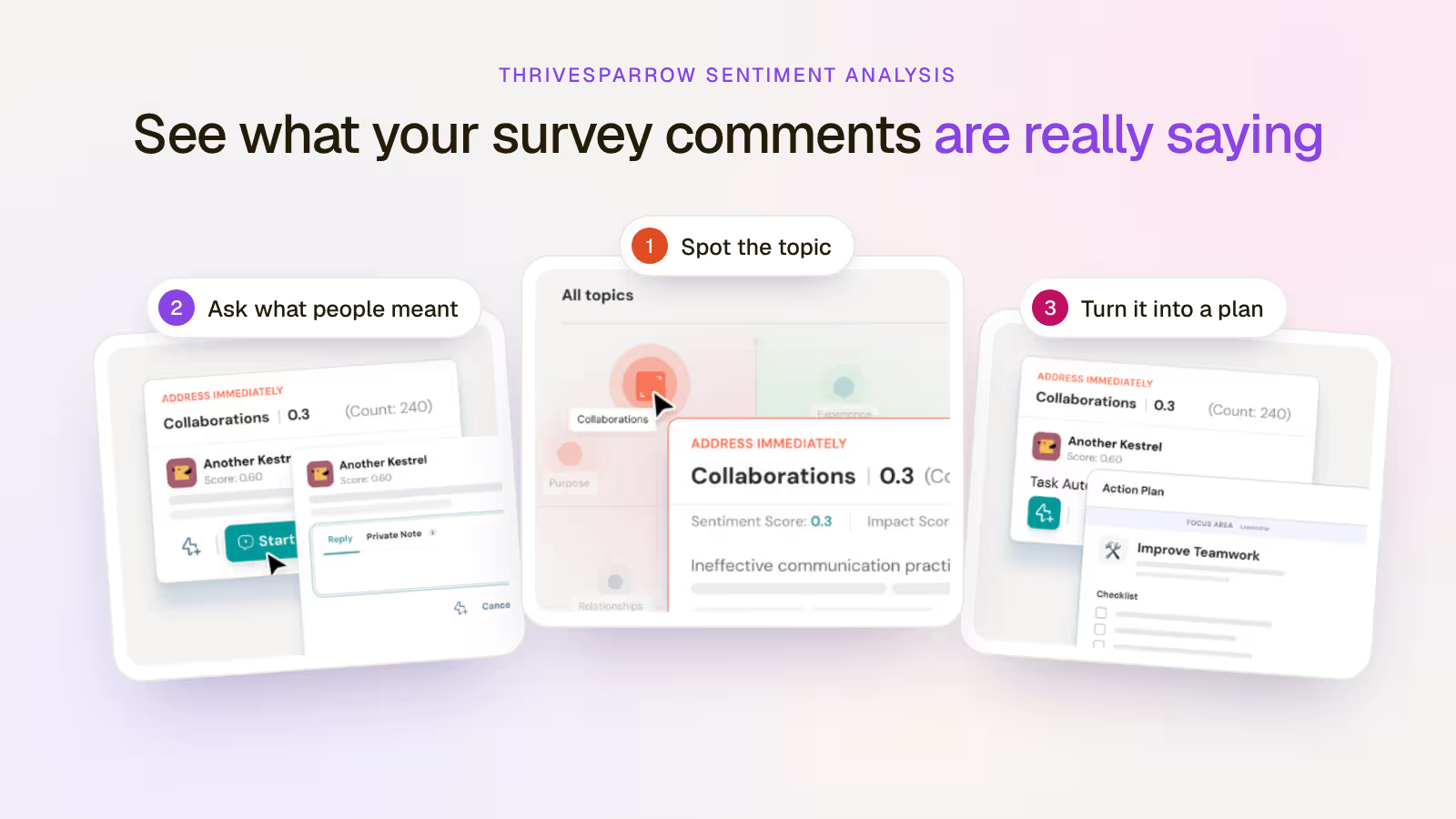
- Open Text Insights. The AI sentiment analysis has already read every written answer and sorted it into topics and smaller sub-topics.
- Spot the problem on the scatter map. Every topic is placed by how people feel about it and how much it matters. Start with anything negative and high-impact, like Skill Development in the image below.
- Hover, then dig in. Hover over a dot to see a quick Infer AI summary. Click it to see the sub-topics, then the actual comments behind them.
- Ask what people meant. Got a vague anonymous comment? Reply to it through Conversations. The employee stays anonymous, and you don't have to guess.
- Turn it into a plan. Make the topic an action plan with owners and progress tracking. Then export the results to PowerPoint for your leadership team.
That matters when your leaders ask, "How do we know?" You can show them the actual comments.
How the scores work.
Every comment gets a score from −1 (very negative) to +1 (very positive), based on what it means, not just the words it uses. For example, "I'm frustrated by the lack of recognition" scores around −0.7. Each topic also gets an impact score, which shows how much that topic affects your overall results. It's based on favorability, eNPS and how often the topic comes up.
The scatter map then splits topics into four groups, so the negative, high-impact ones jump out (see the full method in the help center).
Reaching everyone.
People without a desk can answer by QR code or text message, and surveys work in 100+ languages. ThriveSparrow also connects with Slack, Microsoft Teams, Google Workspace and HR systems like BambooHR, Workday, ADP and HiBob.
Proof.
This is how Sticki got the numbers you read at the top. With the Engage module's sentiment analysis and anonymous follow-up chats, its survey analysis now takes about one to one and a half hours. Action plans go out about a week after a survey closes, not a month later (case study).
"ThriveSparrow has made it much easier for us to turn employee feedback into action. The anonymous chat and sentiment analysis save us a huge amount of time, and the reporting makes it easy to spot trends. On top of that, the support team has been fantastic"
— Laurence Heffernan, Senior Project Manager, Sticki
Pricing:
- Engage: $3 per employee per month. Includes sentiment analysis, Infer AI summaries, pulse and lifecycle surveys, benchmarks and AI action plans.
- Full Platform: $9 per employee per month. Adds performance reviews, goals, recognition and AI Coach to everything in Engage.
- Free with every plan: One-on-Ones and Feedback.
- Billing: both plans are billed yearly.
ThriveSparrow pros:
- Easy to use: a clean layout that teams pick up with little training.
- Faster analysis: sentiment analysis and AI summaries cut survey analysis from days to hours.
- Real follow-up: action plans give each issue an owner and a due date.
- Helpful support: responsive, with hands-on help during setup.
ThriveSparrow cons:
- Fewer integrations than some teams want, and they vary by plan.
- Reports and dashboards could be more flexible to customize.
- Excel exports can need manual cleanup.
- Learning curve and alerts: some advanced settings take time to learn, and notifications can feel noisy.
Source: (4.5/5 from 130 reviews, November 2026).
Bottom line: the best fit if you want comment analysis, pulse surveys, eNPS and reviews in one tool, at a price you can see upfront.
Ask in the demo: run the drill-down on a sample of your own comments.
Try ThriveSparrow free for 14 days!

2. Qualtrics XM Discover: Best for listening across employee and customer channels

What it is:
Qualtrics XM Discover is a feedback-analytics product from Qualtrics, the experience-management software company. It reads what employees and customers say across channels and turns it into topics and trends.
At a glance:
- Price: custom quote. Qualtrics doesn't publish prices, so you ask its sales team for one.
- How to try it: book a demo.
- What it analyzes: what employees write in internal channels such as Slack and the company intranet, plus feedback from customers. You don't need to run a survey for it to work.
Key features:
- Mood tracking in internal channels: Discover for EmployeeXM watches places like Slack and your intranet for trending topics and changes in how people feel.
- Anonymous grouping: it keeps comments anonymous and groups them by theme.
- Urgent-issue alerts: it flags critical issues to the teams who can act.
- Employees and customers together: both kinds of feedback sit side by side.
Qualtrics pros:
- Deep analytics: strong reporting on employee feedback.
- Flexible programs: you can build custom listening programs.
- Handles big data sets: good data management for large programs.
- Expert support: knowledgeable help, with live support available 24/7.
Qualtrics cons:
- Learning curve: setup and navigation take time to master.
- Rigid reports: dashboards are harder to customize than users want.
- Complex data setup: managing employee data and hierarchies can be tricky.
- Uneven support: response times can be inconsistent.
(Source: 4.4/5 from 468 reviews, November 2026).
Bottom line: pick it if your customer feedback already runs through Qualtrics and you want one view of both. Skip it if you mainly need to read survey comments.
Ask in the demo: which internal channels it can read in your setup. Weighing options? See our Qualtrics alternatives.
Sources: Qualtrics' Discover announcement and Discover product page, checked November 2026.
3. CultureMonkey: Best for surveying every stage of the employee lifecycle
What it is:
CultureMonkey is an employee engagement survey platform. It runs engagement, pulse and lifecycle surveys, from onboarding to exit, and uses AI to turn written answers into themes and sentiment.
At a glance:
- Price: custom quote. CultureMonkey doesn't publish prices (pricing page, Nov 2026).
- How to try it: book a demo.
- What it analyzes: the written answers from engagement, pulse, onboarding and exit surveys.
Key features:
- Themes you can correct: written answers are grouped and scored, and an admin can fix any AI tag that's wrong.
- Dashboards by role: separate views for managers, HR and leaders.
- Seven ways to reach people: email, SMS, WhatsApp, Slack, Teams, QR code or kiosk (source).
- Strict anonymity: anonymous surveys never show results for groups smaller than 3 (source).
CultureMonkey pros:
- Great support: responsive and hands-on, in several languages.
- Easy to use: simple for both admins and employees.
- Global reach: surveys in 100+ languages for frontline staff.
- Anonymous conversations: you can talk with employees without revealing who they are.
CultureMonkey cons:
- Slow report downloads: survey reports aren't instant to download.
- Survey coverage: standard surveys may not cover every part of the employee experience.
(Source: 4.7/5 from 67 reviews, November 2026).
Bottom line: a solid choice if you survey people at every stage and anonymity matters a lot. Just plan for a sales call, since you can't see the price upfront.
Ask in the demo: how often the AI tags need fixing on comments like yours.
4. KeenCorp: Best for tracking mood without surveys

What it is:
KeenCorp is a workplace analytics tool. Instead of running surveys, it measures tension and engagement from the patterns in the messages people already send at work.
At a glance:
- Price: custom quote, based on how many employees you include.
- How to try it: book a demo.
- What it analyzes: patterns in the work messages people already send in email, Microsoft Teams, Google Workspace and Slack. It doesn't use surveys.
Key features:
- No surveys needed: nothing extra for employees to fill in.
- Always-on signal: the index updates continuously, not once a quarter.
- Works with your existing tools: email, Microsoft Teams, Google Workspace and Slack.
- Easy to buy through Microsoft: the KeenCorp Index is sold on the Azure Marketplace.
Limitations to know:
- Doesn't read survey comments: if you run surveys, you'll still need another tool for those.
- Trust comes first: because it analyzes people's messages, you need to explain it clearly to employees before you start.
G2 reviews: KeenCorp has no reviews on G2 yet, so the limits above come from its own product listings, not user reviews.
Bottom line: pick it if survey fatigue is your real problem and your leaders want a constant signal. Talk to employees first, though.
Ask in the demo: exactly what message data it reads, and what employees can see about it.
Sources: Microsoft Azure Marketplace listing and TrustRadius profile, checked November 2026.
5. Lattice: Best for connecting engagement with performance reviews

What it is:
Lattice is a people management platform best known for performance reviews and goals. Its Engagement module adds employee surveys with AI insights on comments, right next to its performance tools.
At a glance:
- Price: the Engagement module is $4 per person per month, billed yearly, with a $4,000 yearly minimum (lattice.com/pricing, as of October 2026).
- How to try it: book a demo.
- What it analyzes: comments from engagement, pulse, eNPS and onboarding surveys.
Key features:
- Four survey types: engagement, pulse, eNPS and onboarding surveys.
- AI insights on comments: AI pulls insights from written answers.
- Engagement next to performance: see survey results alongside reviews and goals.
- Published prices: each module has a list price, so budgeting is easy.
Lattice pros:
- Everything in one place: reviews, goals, 1:1s and feedback live together.
- Helpful AI: it drafts review text and summarizes feedback.
- Configurable: templates and review cycles bend to your process.
- Strong support: responsive support and account teams.
Lattice cons:
- Missing features: some tools users want aren't there yet.
- Customization limits: some labels and workflows can't be changed.
- Learning curve: admins and new users need time to get comfortable.
- Too many notifications: alerts can overwhelm employees.
(Source: 4.6/5 from 4,171 reviews, November 2026).
Bottom line: a good choice if you want engagement results and performance reviews in one system. If you only need to read survey comments, a survey-first tool may be simpler.
Ask in the demo: how its AI handles comments, not just review writing. Our Lattice review covers the rest of the suite.
6. Leapsome: Best for surveys, reviews and learning from one vendor

What it is:
Leapsome is an all-in-one people platform. It sells engagement surveys, performance reviews, goals and learning as separate modules on top of its HRIS foundation.
At a glance:
- Price: the Engagement Surveys module is $4 per employee per month, plus Leapsome's HRIS Foundation, which every module needs. The Foundation is free with a module bought by December 31, 2026, then $7 per employee per month (leapsome.com/pricing, as of October 2026).
- How to try it: book a demo.
- What it analyzes: comments from engagement surveys.
Key features:
- AI themes: written answers are sorted into themes.
- Sort and filter: sort themes by sentiment and filter by team or location.
- What changed: it shows what's different since your last survey.
- Pay per module: each module has its own published price.
Leapsome pros:
- Very easy to use: reviewers call it simple and intuitive.
- All in one place: reviews, goals, 1:1s and feedback together.
- Works in Slack: praise and reminders show up where people already are.
- AI writing help: managers get support writing better feedback.
Leapsome cons:
- Navigation: some sections are hard to find.
- Setup takes tweaking: review templates and permissions can be complex.
- Too many notifications: alerts clutter email and Slack.
- Slow new features: some requested features take a while to arrive.
(Source: 4.8/5 from 2,658 reviews, November 2026).
Bottom line: a strong fit if you'll use several of its modules. If you only need surveys, you'll still set up its HRIS foundation.
Ask in the demo: how survey comments connect to the rest of the platform. More detail in our Leapsome review.
Source for the AI features: Leapsome AI, checked November 2026.
7. Culture Amp: Best for industry benchmarks
What it is: Culture Amp is an employee experience platform best known for engagement surveys and industry benchmarks. It's the pick when you want to compare your results with other companies in your industry.
At a glance:
- Price: custom quote, based on your number of employees, the products you choose and your service level (pricing page, Nov 2026).
- How to try it: book a demo.
- What it analyzes: comments from engagement surveys.
Key features:
- AI themes and sentiment: written survey answers are sorted into themes and scored.
- Benchmarks: compare your scores with benchmarks from its customers.
- Survey templates: a big library of research-based templates.
- Action plans: turn focus areas into plans.
Culture Amp pros:
- Rich analytics: deep results with industry benchmarks.
- Fast comment themes: AI summaries spot what people are saying.
- Strong confidentiality: protections that make feedback feel safe.
- Expert support: especially helpful on survey design.
Culture Amp cons:
- Less flexible forms: surveys and review forms are harder to tailor.
- Limited reporting: customizing and exporting reports is restricted.
- Clunky follow-up: action plans and navigation could be smoother.
- Hidden small-team results: privacy thresholds can hide data for small teams.
(Source: 4.5/5 from 1,633 reviews, November 2026)
Bottom line: worth getting a quote if benchmarks are what get your leaders' attention.
Ask in the demo: which benchmark groups match your industry and size. Our Culture Amp review goes deeper.
8. Perceptyx: Best for large, always-on listening programs
What it is: Perceptyx is an enterprise employee listening and people-analytics platform. It runs surveys at large scale and is built for companies with a dedicated people-analytics team.
At a glance:
- Price: custom quote. Perceptyx doesn't publish prices.
- How to try it: book a demo.
- What it analyzes: survey comments across very large organizations, in many languages.
Key features:
- Its own AI models: comments are read for sentiment, theme, intent and emotion.
- Custom dashboards: build views for different leaders.
- Trends over time: track how topics move between surveys.
- Benchmarks: compare results with other organizations.
Perceptyx pros
- Lots of insight: pulse checks show results by team and company.
- Supports action: insights help leaders plan and decide.
- Usable dashboards: reviewers describe the reporting as easy to work with.
Perceptyx cons:
- Reporting flexibility: reports could be more flexible.
- Long setup: implementation takes about 4 months on average.
(Source: 4.5/5 from 40 reviews, November 2026; a small review base, mostly enterprise users)
Bottom line: made for companies with a dedicated people-analytics team. If that's not you, it's probably more than you need.
Ask in the demo: who on your team would run it day to day. Comparing analytics tools? See our people analytics software guide.
Sources: Perceptyx comment analytics and People Insights Platform, checked November 2026.
How does AI sentiment analysis work on employee comments?
Here's the honest truth: a sentiment score on its own tells you almost nothing. The tool reads each written answer and labels its tone as positive, negative or neutral. Better tools then sort comments by topic, like workload, managers or pay. That way you see how people feel about each topic, not just one average.
That topic step is what makes the results useful. "Sentiment is 62% positive" doesn't tell you much. "Comments about workload are mostly negative in two teams" tells you exactly where to start.
Three kinds of comments trip AI up:
- Mixed comments. "I love my team, but the new schedule is exhausting" holds two opinions about two topics.
- Short answers. "Fine" or "same as last time" don't say much.
- Sarcasm and in-jokes. AI can easily read these the wrong way.
That's why being able to click from a topic down to the real comments matters. You can check the AI before you act on it. For more on how this works, see our guide to employee sentiment analysis.
Can ChatGPT do employee sentiment analysis?
Yes, for a one-time batch. You can paste comments into a general AI chatbot and ask it to group them by topic and tone.
But it falls short if you do this regularly:
- You'd be pasting employee comments into a general tool, so check your company's privacy rules first.
- It doesn't hide small groups, so a comment from a 3-person team could give away who wrote it.
- It doesn't track topics from one survey to the next, so you can't see trends.
- Someone has to copy, paste and tidy the output every time.
If you survey more than once or twice a year, a dedicated tool will usually save you that time. If you run one survey with a handful of comments, just read them yourself.
How to choose: 5 questions that expose a weak tool in any demo
Every vendor will show you a nice-looking dashboard. These five questions get you past the demo polish. The answers will tell you more than any feature list.
- How do you handle sarcasm, short answers and mixed feelings in one comment? Ask them to show you, using sample comments (ideally your own).
- Can I drill from a topic down to the individual comments? If not, you can't check the AI before acting on it.
- What's the smallest group you'll show results for? This is called the anonymity threshold. It protects people on small teams.
- What kinds of feedback can you analyze? Survey comments, review comments, exit interviews, or chat and email? Pick the tool that fits the feedback you actually collect.
- What would we pay per year for our headcount, all-in? Include platform fees, minimums and any add-on you'd need for sentiment analysis.
Also check that it connects to your HR system and to Slack or Teams. If a tool can't pull in your org chart, it can't show you results by team.
What does employee sentiment analysis software cost?
Most tools charge per employee per month and bill yearly. Three of the eight on this list publish their prices (ThriveSparrow, Lattice and Leapsome). The other five give a custom quote based on your headcount and the modules you pick. You'll find each tool's price in its review above.
When you compare quotes, watch for two extras: a yearly minimum, and a platform fee that every module needs. Ask each vendor for one all-in yearly number for your headcount, so you compare like with like.
The bigger cost is usually the one you don't see. Gallup estimates low engagement cost the world economy about $10 trillion in lost productivity in 2025 (State of the Global Workplace 2026).
Want a number for your own team? Try our disengagement cost calculator.
Our pick and how to start
If we could give you one piece of advice, it's this: choose based on the feedback you actually collect, not the dashboard that looked best in the demo.
- You collect survey and review comments, and you have under a few thousand people: ThriveSparrow, Lattice or Leapsome. Choose ThriveSparrow if you want to dig into comments and turn them into action plans without buying a big HR suite.
- Benchmarks matter most to you: Culture Amp or Perceptyx.
- You don't run surveys, just chat and email: KeenCorp or Qualtrics XM Discover.
Find out what’s really behind your engagement scores
Run your next pulse survey in ThriveSparrow. See which topics are pulling each team down, read the comments behind them and turn the biggest one into an action plan.
Start your free trial. Running listening for 1,000+ people? Book a demo.
Still comparing? See ThriveSparrow side by side with Culture Amp, Lattice, Leapsome and Qualtrics.
FAQs
1. Is employee sentiment analysis anonymous?
It depends on the tool's settings. Most survey tools only show a group's results once enough people answer, so no one can trace a single answer back to a person. CultureMonkey, for example, won't show results for an anonymous group under 3 people (help center). ThriveSparrow lets admins set the minimum as a fixed number or a percentage of responses, whichever is higher. You can set it separately for managers and admins (help center). Ask each vendor how theirs works before you launch. Our guide to anonymous feedback tools has more on keeping feedback honest.
2. Which tools alert you to sudden shifts in sentiment?
Some tools watch for changes between surveys. In this list, that's KeenCorp, which tracks message patterns over time, and Qualtrics XM Discover, which flags urgent issues to the right team. Survey-based tools show changes each time a pulse survey closes. So a short monthly pulse is the simplest early warning you can set up.
3. Which tools analyze both scores and open-text comments?
All the survey-based tools here do: ThriveSparrow, CultureMonkey, Lattice, Leapsome, Culture Amp and Perceptyx. KeenCorp and Qualtrics XM Discover focus on text from other places, like chat. Once your results are in, see how to analyze engagement survey results.
4. What's the difference between employee sentiment and engagement?
Gallup describes engagement as how attached people feel to their work, their team and their employer (Gallup). It's usually measured with rating questions. Sentiment is how people feel, which you mostly see in their comments. It often explains why an engagement score went up or down. For the engagement side, see our guide to what employee engagement is.