









PerformYard shows up on nearly every "best performance management software" list for 2026. But "popular" and "right for your team" aren't the same thing. This review breaks down its actual pricing, features, and limitations using public data and verified buyer feedback, so you can decide in ten minutes whether it's worth a demo call.
A quick disclosure before we start: this review is published by ThriveSparrow, a performance and engagement platform that competes with PerformYard in parts of this space. We've tried to keep the facts straight and the comparisons fair. You can judge for yourself as you read, and we'll flag clearly where we think our platform genuinely does something differently.
THE QUICK ANSWER
Best for: Small to mid-sized companies (roughly 30–500 employees) that are moving off spreadsheets and email chains and want a straightforward, customizable review process, without paying for a bloated all-in-one HR suite.
Not the best fit for: Teams that want performance management, engagement surveys, recognition, and learning all working together natively in one platform, without stacking paid add-ons.
Starting price: ~$5/user/month for core performance management, billed annually. Engagement adds another $1–3/user. AI Insights and Meetings features are priced separately.
Free trial: No. PerformYard's own site offers a scheduled demo call, not a self-serve trial. There's no sign-up flow to test the product without talking to sales first.
Bottom line: PerformYard does reviews and continuous feedback genuinely well, at a fair price, with excellent customization. It's a narrower tool by design. If you want engagement, recognition, and performance management working together without add-on pricing, it's worth comparing against something built that way from the ground up.
What Is PerformYard?
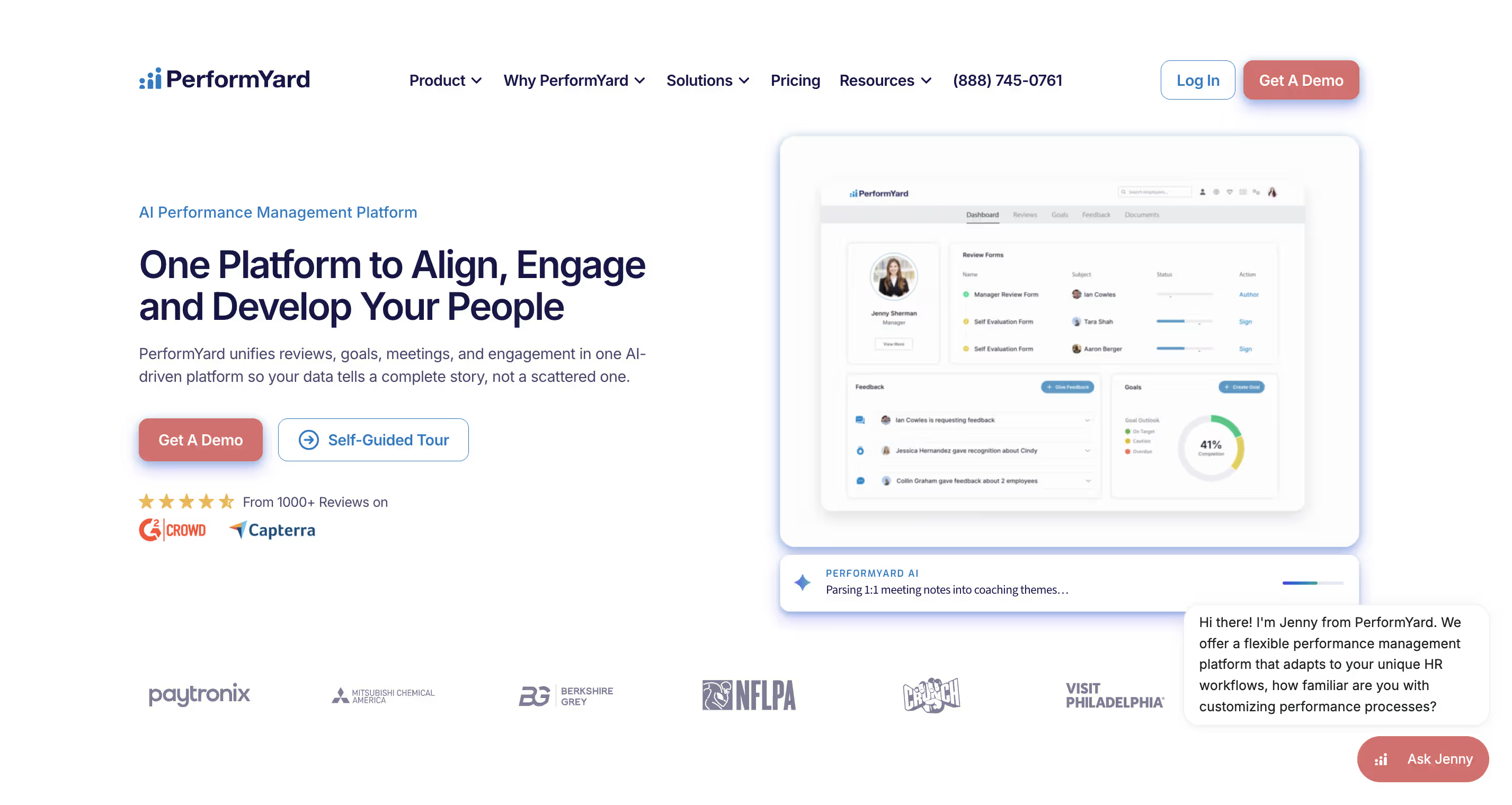
PerformYard is a cloud-based performance management platform built to replace the spreadsheet-and-email approach to employee reviews with something structured and trackable. It's been around for over a decade, and it's carved out a reputation as the tool for HR teams who want flexibility without complexity. You can run annual reviews, 360-degree feedback, continuous check-ins, or all of the above, and shape each cycle to match how your organization actually works instead of forcing your process into someone else's template.
It's not trying to be a full HR suite, though. There's no payroll, no benefits administration, no applicant tracking. It does performance: reviews, goals, feedback, and (as an add-on) engagement. That focus is really the whole personality of the product.
With that context in mind, here's exactly how we put this review together.
How We Evaluated It
This review is based on a combination of PerformYard's own site, publicly available pricing and feature documentation, third-party review data from G2 and Capterra, and independent reporting from software comparison sites. We did not conduct hands-on testing inside a live PerformYard account for this piece, and we want to be upfront about that rather than imply otherwise. Where a claim is genuinely well-documented across multiple sources, like pricing ranges or core features, we've treated it as reliable. Where third-party sources disagreed with each other, like free trial availability, we checked PerformYard's own site directly to resolve it rather than leaving it ambiguous.
To keep this consistent and comparable across the reviews on this site, we weigh five areas:
We haven't assigned PerformYard a single numeric score in this piece, because we don't have verified hands-on testing data or a large enough independent sample of support-response times to defend a specific number honestly. If we run structured testing on a live account, we'll publish the score and update this section. We won't retrofit a number to match the narrative.
PerformYard Features
As a performance management system, PerformYard covers the core lifecycle: reviews, goals, feedback, reporting. It just does it with more customization than most tools at this price. Here's what that actually looks like in practice.
1. Review Cycles That Actually Bend to Your Process
This is PerformYard's strongest card. Reviews can run upward, downward, lateral, self-assessed, or external (bringing in feedback from clients or partners outside the company), which is the core of what most 360 review software needs to do well. Cycles are fully customizable rather than locked into a rigid annual or quarterly structure. Managers get a live dashboard showing who's completed their part of a review and who's lagging. That solves the classic "did everyone actually finish this?" chase that eats up HR's time every cycle.
2. OKR Software & Goal Tracking
As OKR software, PerformYard handles quantitative, qualitative, individual, and team-level goals, tying them directly into review conversations so performance discussions aren't disconnected from what people were actually supposed to be working toward.
3. Continuous Feedback and 1-on-1s
Beyond formal reviews, PerformYard supports ongoing feedback, 1-on-1 meetings, quarterly check-ins, and exit interviews. This matters if your culture leans toward frequent, informal touchpoints that build employee experience over time, rather than a once-a-year review event that people dread.
4. Engagement Module (Add-On)
This is where things get more modular. Engagement surveys and AI-driven recommendations for improving engagement sit in a separate module with separate pricing, rather than being baked into the core product. If engagement, or broader employee development, is a priority for you, factor that add-on cost in from day one rather than discovering it during the sales call.
5. Reporting and Calibration
Dashboards let you compare performance across the organization, run calibration analysis to spot top performers, and keep review history and notes centralized rather than scattered across email threads.
PerformYard Integrations and SSO
PerformYard integrates with common HR systems and supports single sign-on, which matters if IT is going to have opinions about yet another login system.
PerformYard Pricing & Cost
Here's where we try to give you real numbers instead of a vague "contact sales" shrug.
A worked example: for a 50-person company using Core Performance Management ($7/user, a mid-range estimate) plus the Engagement add-on ($2/user), you're looking at roughly $9/user/month, or about $5,400/year. And that's before any AI Insights or Meetings add-ons, or Enterprise-tier customization if you need it.
Two things worth knowing before you talk to sales:
- Contract length. Standard billing is annual, and multi-year contracts appear to be optional, offered as a discount rather than required. The thing to actually watch for is pricing after year one. Intro rates can step up on renewal, so ask what the second-year number looks like before you sign.
- No self-serve trial. PerformYard's own site routes every evaluation through a scheduled demo call. There's no way to sign up and test the product without talking to sales first.
Numbers aside, here's how it actually holds up once you weigh the pros against the cons.
PerformYard Pros and Cons
Pros
1. Genuinely flexible review cycles. The ability to run upward, downward, lateral, self, and external reviews, and customize cadence and templates for each, is rare at this price point. Several review sites specifically call out the review-cycle customization as rivaling platforms that cost twice as much.
2. Transparent, fair pricing relative to the category. At $5–10/user/month, PerformYard sits at roughly half the cost of Lattice and closer to a third of Culture Amp's full suite. That matters a lot if you're a 50-200 person company watching every line item.
3. Strong goal and OKR tracking. Quantitative, qualitative, and team-level goals are handled well, and they connect directly into the review process instead of living in a separate spreadsheet.
4. SOC 2 Type II security. For HR data specifically, this isn't a nice-to-have. It's a baseline a lot of buyers will require, and PerformYard has it covered with third-party audits and continuous monitoring.
5. Reviewers consistently mention it saves real admin time, centralizing review types, reducing paperwork, and cutting down the manual chasing that spreadsheet-based processes create.
Cons
1. Automation has real limits. A recurring complaint across review platforms is around manual review-date changes and limited automation. If you're expecting a fully hands-off, auto-scheduling system, this may require more manual upkeep than you'd like.
2. Engagement isn't native. It's an add-on. If engagement surveys and workforce sentiment tracking are a core part of what you're solving for, you'll be paying extra for a module rather than getting it as part of the base platform. For context: ThriveSparrow's Performance tier is priced the same as PerformYard's core plan ($5/user/month) but includes engagement and AI sentiment analysis in that price rather than as a separate line item — worth a quick look if this is the gap that matters most to you.
3. No learning management, and only basic goal tracking beyond OKRs. If you're hoping to connect performance reviews to structured development paths or skill-building content, PerformYard doesn't go there.
4. No self-serve way to try it first. There's no free trial. Every evaluation goes through a scheduled demo call, so budget time for a sales conversation before you can actually see the product.
If that's a dealbreaker, ThriveSparrow's checkout is self-serve, no call needed, try it free for 14 dyas!.
.svg)
5. Watch for renewal pricing. Multi-year contracts are offered as an optional discount, not required. But intro-year rates can increase when you renew, so get the year-two number in writing before you sign.
6. Pricing isn't fully self-serve. While the starting numbers are public, your actual cost depends on modules, headcount, and implementation needs. Most buyers will still need a sales call to get a final number.
Who Should (and Shouldn't) Use PerformYard
It's a strong fit if: you're a small-to-mid-sized company replacing spreadsheets and email with a structured review process, you want deep customization over review cycles and templates, and you don't need engagement, recognition, or learning bundled in.
It's probably not the right fit if: you want performance, engagement, and recognition working together as one connected system without stacking separate module costs, or if you're a larger organization that needs a genuinely comprehensive HR suite rather than a focused performance tool.
Most buyers land pretty clearly on one side of that line once they've read through the pricing and cons above. If you're still weighing other names too, here's the broader field.
PerformYard Alternatives & Competitors
If PerformYard's mix of strengths and gaps has you weighing other options, here's how it stacks up against the tools most buyers put next to it:
(Full disclosure again: we publish this review, so weigh that row accordingly. The numbers above are independently verified, not just our own claim.)
PerformYard vs. Lattice, specifically
This is one of the most common side-by-side searches, so it's worth its own quick breakdown. We've also published a dedicated PerformYard vs. Lattice comparison if you want the full detail. Lattice bundles performance, development, and compensation planning into one connected ecosystem, with a more polished interface and stronger AI coaching tools. But it costs meaningfully more and is generally built for larger, more complex organizations.
PerformYard, by contrast, gives you more granular control over your specific review process at a lower price, but you'll do more manual configuration to get there. If you're under 100 employees and your main need is structured reviews without a big price tag, PerformYard likely wins on value. If you're scaling past 100 people and want development and compensation planning natively connected to performance, Lattice's extra cost may be justified.
Price and scope aside, one thing every option on this list needs to get right is security. So before you shortlist anyone, here's what to check.
PerformYard Security & Compliance
PerformYard maintains SOC 2 Type II controls, backed by third-party audits and annual penetration testing. Data is encrypted both at rest and in transit, and the platform runs on hardened cloud infrastructure with continuous monitoring. SSO is supported for centralized authentication, letting you enforce your existing identity policies rather than managing a separate login system. For HR data specifically, this gives you a defensible security posture to point to during procurement or vendor review. PerformYard's own security documentation confirms these controls in more detail if you want to verify before a vendor-risk review.
Final Verdict
PerformYard earns its reputation honestly: it's a focused, well-priced, genuinely flexible tool for companies that need structured performance reviews and don't want to pay enterprise-suite money to get there. The review cycle customization is a real differentiator, and the pricing transparency (relative to the "call us for a quote" norm in this category) is refreshing.
Where it asks you to compromise is modularity. Engagement, AI insights, and deeper HR functionality all come as separate line items rather than a connected whole. If that tradeoff works for your team, PerformYard is a smart, defensible choice.
If it doesn't, you already know it by now. The add-on pricing, the sales-call-gated evaluation~~, the reviews that don't turn into anything~~: if either of those stood out while you were reading, that's not a coincidence. Those are exactly the gaps ThriveSparrow was built to close, starting at $2/user/month, with the numbers published where you can see them, used today by teams at Siemens, Tech Mahindra, and greytHR.
See ThriveSparrow's real pricing and start free. Takes about two minutes, no credit card, no demo call required.
FAQ
1. Does PerformYard offer a free trial?
No. PerformYard's site offers a scheduled demo call as the only way to evaluate the product. There's no self-serve trial signup.
2. Is PerformYard SOC 2 compliant?
Yes. It maintains SOC 2 Type II controls with third-party audits and annual penetration testing.
3. How much does PerformYard cost per employee?
Core performance management starts around $5/user/month, rising to about $10/user/month depending on headcount and configuration. The engagement add-on costs an additional $1–3/user/month, and AI features are priced separately.
4. What's the difference between PerformYard and Lattice?
PerformYard focuses narrowly on performance management (reviews, goals, feedback) at a lower price point. Lattice bundles performance with development and compensation planning in a more comprehensive, higher-priced platform aimed more at mid-market and larger companies.
5. Does PerformYard have engagement surveys built in?
Not in the core plan. Engagement surveys and AI-driven engagement recommendations are a separate paid add-on module.
6. Is PerformYard good for small businesses?
Generally yes, particularly for companies moving off spreadsheet-based reviews for the first time. Its per-user pricing and template flexibility make it accessible without a big upfront commitment. Just confirm what your pricing looks like after year one, since intro rates can increase on renewal.
7. Is PerformYard worth it?
For companies that specifically need structured, customizable performance reviews at a fair price, yes. If you also need engagement, recognition, or learning built in natively rather than as paid add-ons, weigh the total modular cost against an all-in-one alternative before deciding.
8. What are PerformYard's main competitors?
The most commonly compared alternatives are Lattice, Culture Amp, 15Five, and ThriveSparrow. Each targets a slightly different buyer. See our Lattice vs. PerformYard breakdown or the comparison table above for how they differ on price and scope.
9. Is PerformYard a legit company?
Yes. It's an established performance management vendor that's been operating for over a decade, maintains SOC 2 Type II compliance, and is listed with verified reviews on G2, Capterra, and Trustpilot.
10. How does PerformYard work?
Admins set up review cycles (annual, quarterly, or continuous), assign templates and participants, and track completion through a live dashboard. Employees and managers fill out reviews, goals sync in from the goal-tracking module, and calibration tools help normalize ratings across teams before final sign-off.
11. What size companies use PerformYard?
It's most commonly adopted by small to mid-sized organizations, roughly 30 to 500 employees, though its Enterprise tier with custom implementation is built to support larger companies as well.