


Let's be honest—we've all been there. Someone on your team absolutely crushes it on a project, and you want to do more than just drop a 🎉 in the group chat. You know they deserve real recognition, the kind that feels official and meaningful. But how?
That's exactly why we built Awards.
The Recognition Gap We're Closing
Here's what we've noticed: ThriveSparrow has always been amazing for those everyday high-fives between colleagues. Someone helps you debug code at 4 PM? Send them kudos. A teammate covers your client call when you're sick? They deserve a shout-out.
But what about those bigger moments? The sales rep who demolished their quarterly target. The engineer who mentored three junior developers while shipping two major features.
These achievements deserve more than peer-to-peer props—they deserve company-wide recognition that says, "We see you, and what you did matters to our mission."
That's where Awards come in.
Setting Up Awards
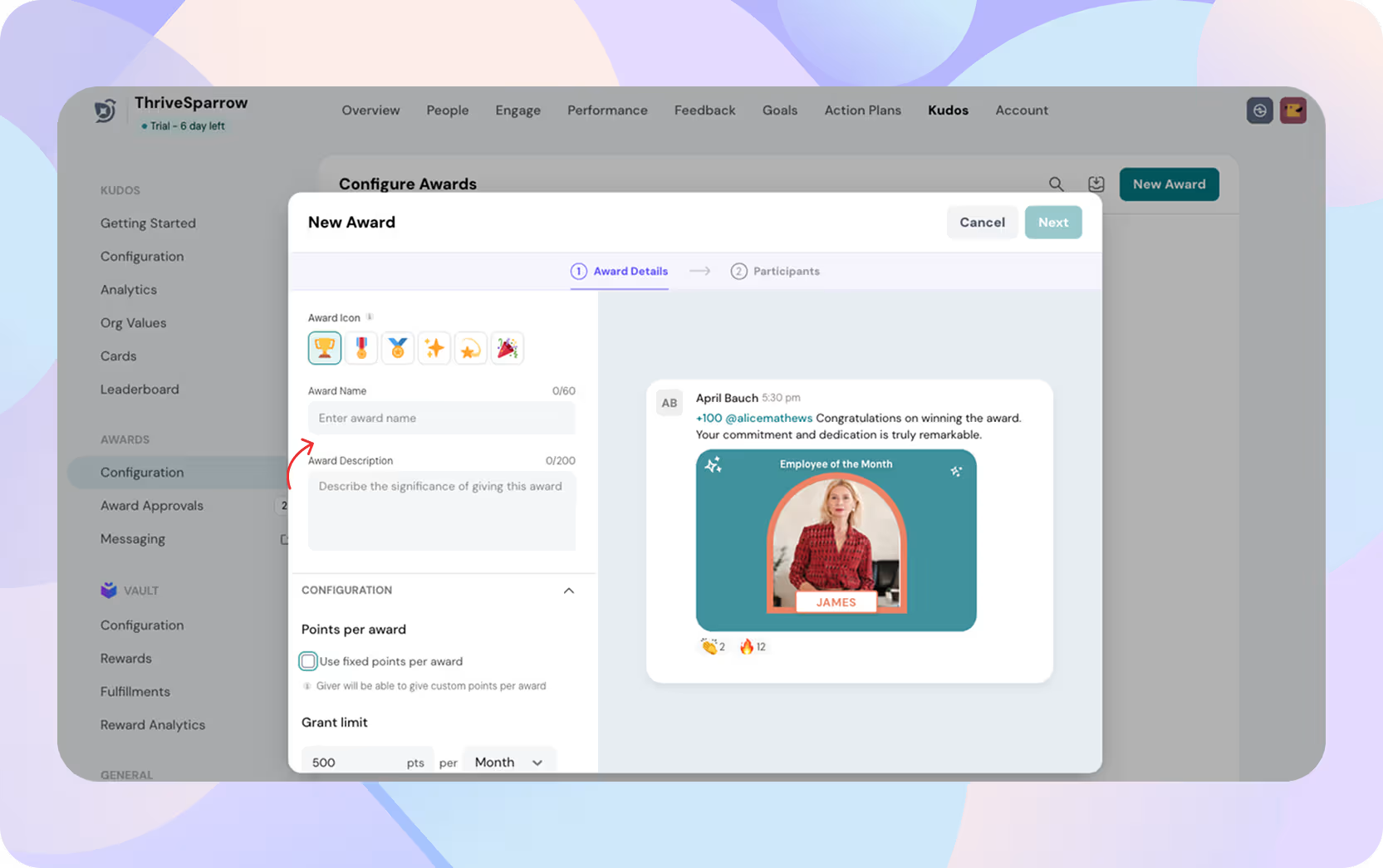
We made creating awards very easy because, let's face it, you have actual work to do.
1. Name it and frame it.
Give your award a title that means something. "Team Player Award" tells people this is about collaboration. "Customer Champion" signals your commitment to service.
The description? Think of it as setting expectations—it helps people understand who should win and why it matters.
2. Decide what it's worth.
Recognition hits different when there's tangible value attached. You can set fixed points (everyone gets 100) or make it flexible (givers choose between 50-200).
Want to give five awards a month? Set a 500-point budget with 100 points each. Prefer to spread recognition around? Make the points flexible and watch multiple people get recognized until the budget runs out. Your finance team will love that it's predictable.
3. Make giving easy.
Create a default message and template so people aren't starting from scratch every time. Decide if awards should blast across the company feed or stay private via email. You can even let givers choose on the spot—sometimes recognition is a celebration, sometimes it's a quiet "thank you."
4. Keep it meaningful.
Set limits on how many times someone can give a particular award. This stops people from going overboard and ensures each award actually means something.
Who Can Give, Get, and Approve?
Recognition should feel fair, not political. That's why we built flexibility into who participates:
Givers: Maybe everyone can nominate someone for "Culture Champion," but only department heads can give out the "Quarterly Excellence" bonus award.
Recipients: Decide who's eligible. Open it to everyone, limit it to certain departments, or get creative with cross-functional teams. Your call.
Approvers: Most awards can be auto-approved and instant. But if you need oversight, set up an approval chain (up to four levels). Only one person per level needs to approve, so nothing gets stuck in committee limbo.
Giving an Award (From an Employee's Perspective)
Let's walk through what your team will actually experience:
Step 1:
You're scrolling the home feed and see "Give Award." You click it and boom—only the awards you're allowed to give show up. Each card tells you what it's for, how many points it's worth, and if it needs approval.
Step 2:
You pick your award and move to the fun part—personalizing it. The default message appears, but you can edit it to add something specific like "Sarah, the way you handled that angry client call was masterful. You turned a disaster into a testimonial." Swap the image if you want. Adjust points if that's allowed. Choose public or private.
Step 3:
Hit send. If there's an approval process, it kicks in. Once approved, the recipient gets the award, and if it's public, everyone sees it in the feed. The whole thing takes less time than writing a good email. That's the point.
Approvals Without the Bureaucracy
If you've set up approvals, managing them is straightforward. Head to Awards → Approvals and you'll see three tabs:
Pending: Every award waiting for sign-off is here—who gave it, who's getting it, what level it's at, and who needs to approve next. Search by name, date, or recipient. Need to override something? You can.
Approved: Once it clears all levels, it lands here and points get credited.
Declined: If someone says no, the award immediately moves here. No confusion, no wasted time.
Everything's transparent, everything's trackable.
Keeping Your Program Fresh
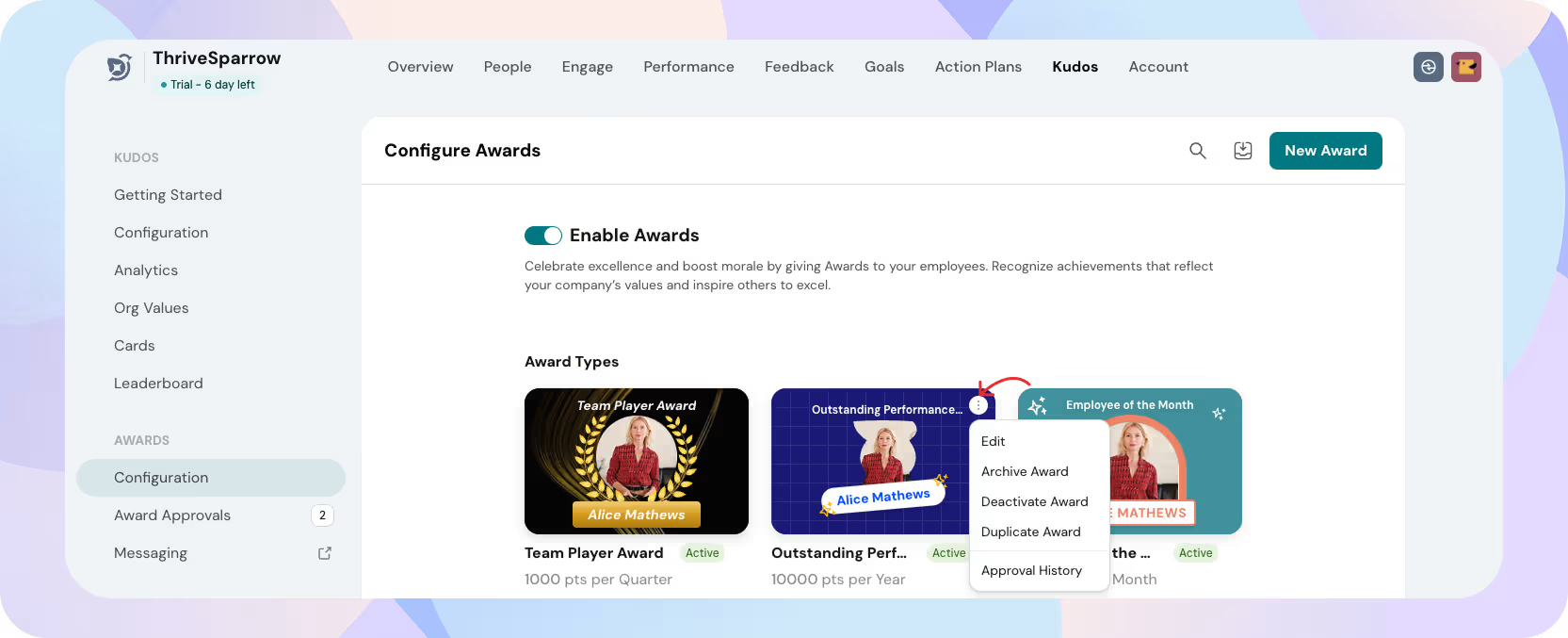
As your company evolves, so should your awards. The Awards Configuration page shows all your active and archived awards. Need to pause one temporarily? Disable it. Want to create a variation? Duplicate and tweak. Awards getting stale? Archive them.
You can also see the history—who got each award, when, and how many times it's been given. Bulk actions let you update multiple awards at once when you're doing spring cleaning.
Why This Actually Matters
Okay, features are cool and all, but let's talk about what Awards actually does for your team:
Your values become visible. Name an award "Innovation Award" and suddenly people know innovation isn't just a word in your handbook—it's something you celebrate. Abstract values become real actions.
Motivation gets clarity. When there's a clear reward structure, people know what aiming high looks like. They're not guessing what leadership cares about.
Recognition becomes democratic. Peers and managers both get to uplift people. The optional approval process keeps things fair without killing momentum.
Remote teams feel connected. For distributed companies, public recognition creates those shared moments that used to happen naturally around the office.
People stick around. Recognition directly impacts retention. We know this. You know this. Now you have a tool that makes it systematic, not sporadic.
Rolling This Out? Here's What Works
A few quick tips for announcing Awards internally:
Start with the why. Tell your team what problem this solves: "We haven't had a great way to do formal company recognition. Now we do."
Make it visual. Screenshots, demo videos, quick walkthroughs—people get it faster when they see it.
Tailor your message. Talk to managers about ease of setup, talk to employees about personalizing recognition, talk to HR about budget control. Everyone cares about different things.
Give them a nudge. "Give your first award today" or "Nominate a teammate this week." Clear CTAs drive action.
Listen to feedback. Ask people what's working and what's not. Iterate. Get better together.
Ready to Start?
Recognition shouldn't be complicated. It shouldn't require a committee meeting or wait for the annual awards ceremony. It should be baked into how you work, every single day.
That's what Awards does. It lets you celebrate the wins—big and small—that actually move your company forward.
So go ahead. Log into ThriveSparrow, create your first award, and watch what happens when people feel truly seen. Because when recognition becomes part of your culture, everyone wins.
.svg)